
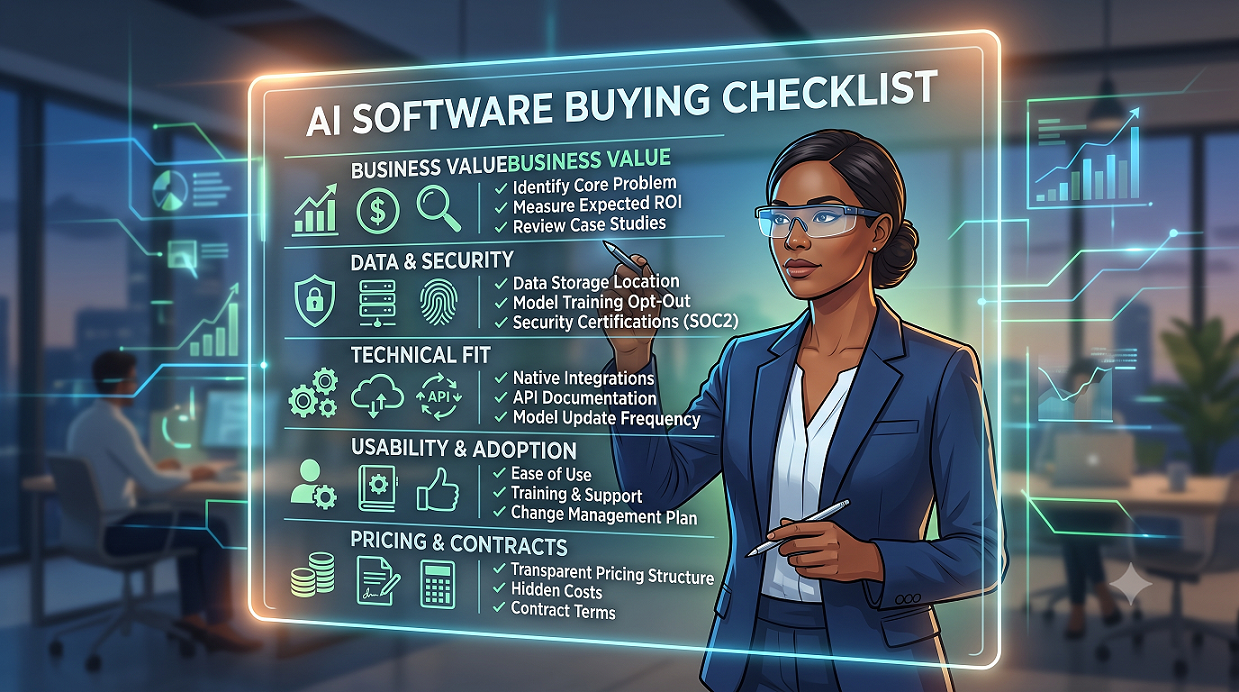
Buying AI tools feels exciting right up until you realize how easy it is to pick the wrong one. A clear AI software buying checklist keeps you from getting dazzled by demos and forces vendors to prove they can actually solve your real problems.
If you’re about to invest serious budget, you need more than a feature tour. You need specific questions that expose hidden costs, risks, and limits so your team can buy with confidence instead of pressure.
Why you need an AI software buying checklist before any demo
Most teams start with pricing pages and product tours, then only later discover deal-breakers like missing integrations or weak security. Turning that chaos into a structured AI buying checklist gives you a shared lens to compare vendors on facts, not gut feel.
A good list of questions also keeps stakeholders aligned, so legal, IT, security, and business owners are all pushing in the same direction instead of arguing at the eleventh hour.
Set your goals before talking to vendors
Before you even open your AI software checklist, write down the specific business outcomes you expect, such as reducing ticket resolution time or increasing content output.
If you can’t connect the tool to a measurable goal, you’re not ready to evaluate it, and you’ll struggle to justify the spend internally.
read also :- Whop Engine Review
Group questions into clear decision areas
Your AI evaluation checklist will be a lot easier to use if you group questions into buckets like business value, data and security, technical fit, change management, and commercial terms.
This makes it much simpler to pull in the right expert at the right time so the process doesn’t stall or drift for months.
Questions about business value and use cases
Start every AI tool checklist with value-focused questions so you don’t waste cycles on products that look clever but don’t move the needle for your team.
The goal is to find out if this tool fits how your business actually works, not some idealized workflow from a sales deck.
5 key questions on business impact
1. What concrete business problem does this tool solve for us? Ask the vendor to restate your use case in their own words and show real examples from similar customers.
2. What leading and lagging metrics will this tool improve? Push for numbers: time saved per task, reduced error rates, or uplift in output, not just vague claims about productivity.
3. What evidence do you have that customers like us achieved those results? Ask for case studies or references from your industry and size, not just big brand logos.
4. How does the AI handle edge cases and messy real-world data? Many impressive demos use clean, ideal inputs that don’t resemble your day-to-day reality.
5. What does a realistic 30–60–90 day rollout look like? Have them walk you through the first three months so you understand effort, owners, and early wins.
At this stage, you’re building a software buying guide that ties every feature back to specific outcomes and time frames.
Questions about data, security, and compliance
Security and compliance can make or break an AI deal, especially if you work with customer data, health information, or financial records.
Bring in your security or legal team early so your AI implementation checklist reflects your actual risk profile, not just what the vendor thinks is “standard.”
6 essential questions on data handling
6. Where is our data stored and processed? Clarify regions, sub-processors, and how they handle backups and disaster recovery.
7. Does your model train on our data by default? If so, ask how to opt out and how they segregate your data from other customers.
8. What certifications and audits do you hold? Look for things like SOC 2, ISO 27001, or industry-specific standards relevant to your environment.
9. How do you handle data retention and deletion? Confirm how quickly they can delete data on request and what’s logged during that process.
10. How do you secure access for admins and end users? Ask about SSO, MFA, role-based access, and audit logs for critical actions.
This is also where your AI purchasing checklist should include questions about incident response, breach notification timelines, and responsible AI policies.
Questions about technical fit and integration
Great AI tools that don’t integrate with your existing stack quickly become shelfware because no one wants to maintain workarounds.
Make sure your AI vendor evaluation includes your architects or senior engineers so you’re not surprised by integration work later.
5 questions to test technical readiness
11. Which systems do you integrate with natively today? Ask for specifics: CRM names, help desk tools, data warehouses, and content platforms you already use.
12. Do you provide APIs, SDKs, or webhooks, and how are they documented? Have your technical team quickly review the docs, rate limits, and versioning approach.
13. How do you handle model updates and breaking changes? You need to know how often things change and how much notice you’ll get.
14. What are the performance and latency expectations under load? Clarify what happens during traffic spikes or batch processing windows.
15. How do you support different environments like dev, staging, and production? This matters a lot if you treat AI workflows as part of your core software delivery process.
As you refine your AI software selection approach, document any custom development, data pipelines, or middleware you’ll need to make the product truly useful.
Questions about usability, change management, and support
A powerful AI tool that your team finds confusing will create more frustration than value, no matter how advanced the underlying model is.
Your AI procurement guide should dig into how the vendor helps people adopt new ways of working, not just how they configure settings.
5 questions on adoption and training
16. How long does it typically take a new user to become productive? Ask what “good” looks like in the first week and first month.
17. What training materials and onboarding support do you provide? Look for live sessions, office hours, internal playbook templates, and role-specific paths.
18. How do you help customers drive adoption across teams? Strong vendors often share change management tips, internal comms examples, and champions programs.
19. What does ongoing support look like after go-live? Clarify support hours, SLAs, response times, and whether you get a named account manager.
20. How do you collect and act on product feedback? You want a partner that actually improves based on real customer input, not just their own roadmap.
An honest AI tool checklist should also capture red flags such as slow response to tickets or vague answers about roadmap priorities that affect your use case.
Questions about pricing, contracts, and vendor stability
Pricing for AI products can get confusing fast, with combinations of seats, usage, and infrastructure charges layered together.
Your AI software checklist isn’t complete until you understand not just today’s quote, but what costs might look like if usage doubles or your needs change.
5 questions on cost and risk
21. How is pricing structured, and what drives increases over time? Ask how they handle overages, currency changes, and new feature tiers.
22. What’s included in the base price versus add-ons? Clarify which features, support levels, and integrations cost extra.
23. Can you walk us through a sample invoice for a customer like us? A mock invoice exposes hidden fees and helps finance teams plan.
24. What contract terms should we pay special attention to? Watch for auto-renewal language, usage floors, and data ownership clauses.
25. How healthy is your business, and how are you funded? You don’t need every detail, but you should understand runway, customer concentration, and long-term plans.
Turning these points into a clear AI evaluation checklist gives you a repeatable way to compare vendors without getting lost in fine print or one-off discounts.
Turning your checklist into a reliable buying process
The real power of an AI software buying checklist shows up when you use it the same way every time, across vendors and across quarters, instead of reinventing the process for each new tool.
Done well, it shortens sales cycles, reduces internal friction, and helps you defend your decision when budgets get questioned.
Three ideas help teams get value fast: first, keep the checklist short enough to use; second, assign clear owners for each section; third, update it after every project with what you wish you’d asked sooner.
If you’re ready to formalize how you evaluate AI, start by copying these 25 questions into your own template, add 5–10 organization-specific questions, and share it with IT, security, and finance.
Used consistently, a thoughtful AI purchasing checklist becomes a quiet advantage: you avoid bad bets, move quicker on good ones, and build a track record of AI projects that actually ship and stick.
If you’d like help shaping your next AI decision, use this AI software buying checklist as your baseline, then adapt it to your stack, risk tolerance, and stage of AI maturity with guidance from Ai Buyer Guide.