
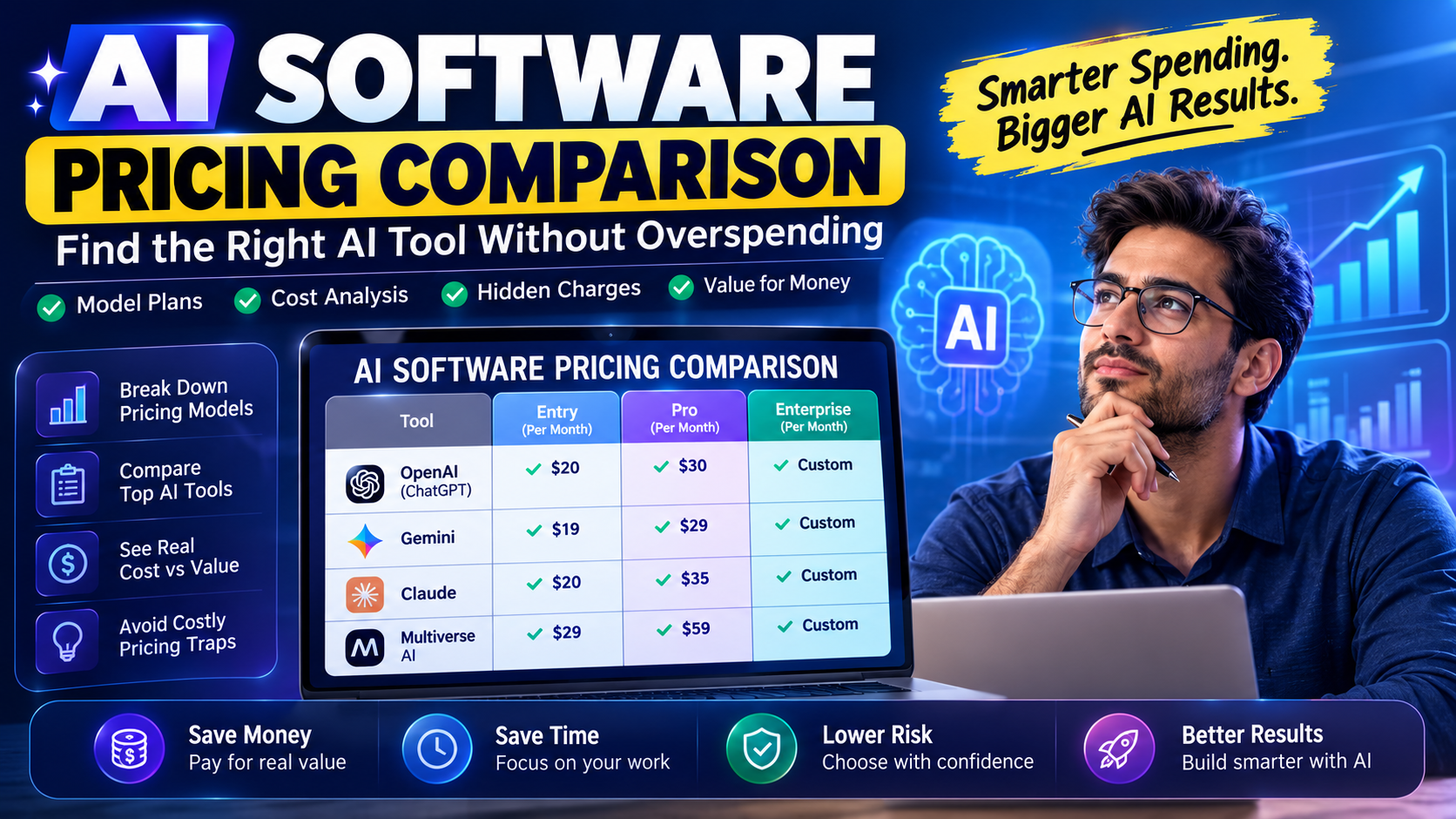
AI subscriptions can feel like cable bundles all over again: lots of promise, fuzzy pricing, and a bill that quietly creeps up. If you’re trying to run an AI software pricing comparison without losing a day to spreadsheets, you’re in the right place.
This guide breaks down how AI companies price their tools, what you really get at each tier, and how to compare options side by side so you don’t overspend. We’ll look at common plans, hidden costs, and ways to measure value instead of just chasing the lowest number.
What drives AI software pricing in 2026?
Most teams notice the sticker price first, but the real AI pricing comparison starts with understanding what actually drives that number. Vendors are balancing compute costs, model access, and support, and they package those into plans that look simple on the surface but behave very differently under real use.
Under the hood, the biggest levers are usage volume, model tier, and how much human support you need. If you ignore those, the AI software cost that looked reasonable in month one can double once your team starts using it daily.
Read also :- Best AI Tools for Small Businesses
Core pricing models you’ll see
Almost every AI vendor in 2026 uses some mix of three models: per-seat, usage-based, and flat subscription. In a per-seat setup, you pay a set fee for each person who can log in, which makes forecasting easier but can get pricey as your team grows.
With usage-based plans, you pay for tokens, credits, or API calls, which can make a single AI tool pricing line item look tiny until a big project hits and you blow past your allowance. Flat subscriptions sit in the middle, usually bundling a generous usage cap that covers typical business use.
How plan tiers really change your costs
Entry plans usually look attractive, but they cap critical features like context length, file size, or advanced models. When you’re comparing AI subscription pricing, notice which limits you’re likely to hit in the first three months, not just what’s technically included.
Upper tiers often add priority support, higher reliability, and stronger uptime guarantees. Those don’t jump out on a sales page, but for teams running key workflows on AI, the real cost of downtime can make premium tiers cheaper over a full year.
Key components of AI software plans you should examine
The marketing page might highlight “Pro” and “Enterprise,” but every serious buyer should break each offer into parts. The structure of AI software plans reveals where vendors expect you to upgrade later, and that’s exactly where your long-term costs hide.
Before you commit, go beyond the bullet list and read the fine print around limits, add-ons, and fair use clauses. That’s where many of the surprises live, especially for growing teams.
Usage limits, tokens, and fair use rules
Most vendors meter usage through tokens, messages, credits, or documents processed. The label doesn’t matter as much as how quickly your everyday workflows burn through them under normal pressure.
Any solid AI pricing guide will push you to translate those abstract limits into real scenarios: daily content output, customer chats per month, tickets summarized, or reports generated. If the vendor can’t give you example burn rates, assume you’ll underestimate usage.
Features, add-ons, and integration boundaries
Beyond usage, pay close attention to which features are actually native and which require paid integrations or extra seats. Things like SSO, custom model fine-tuning, or audit logs often sit behind higher tiers, which changes the total AI software value for security-conscious teams.
Some vendors charge extra for integrations with CRM, help desk, or data warehouse tools, and that can quietly turn an affordable AI software decision into a premium commitment over a single renewal cycle.
How to run a practical AI software pricing comparison
You don’t need a 20-tab spreadsheet to compare tools, but you do need a consistent method. A good AI software pricing comparison starts with your workflows, not with a list of vendors; otherwise you’ll end up paying for shiny features your team never uses.
Start by listing the specific jobs you want AI to cover: drafting content, summarizing tickets, generating code, responding to support chats, or creating reports. Then map each workflow to required features so you can see what’s truly non-negotiable.
Build a simple cost-per-outcome model
The easiest way to compare AI subscription comparison options is to reduce everything to a cost per outcome that matters to your business. You’re not buying tokens; you’re buying solved tickets, campaigns shipped, or hours saved.
Pick one or two representative workflows and estimate, conservatively, how many units per month you’ll push through each tool. Once you have that baseline, you can pressure-test different plans and see which one survives a realistic workload.
A quick comparison framework
When you’re lining up vendors, a simple structure keeps things honest:
- Define your must-have features and clearly separate nice-to-haves.
- Estimate realistic monthly usage based on last quarter’s activity.
- Calculate effective price per user or per outcome for each plan.
- Check annual vs monthly pricing, including any committed discounts.
- Note any mandatory onboarding, support, or overage fees.
Run that checklist, and the AI software costs that looked similar on the surface often spread out quickly, revealing clear winners and backups.
Benchmark ranges for AI tool pricing in 2026
Prices shift, but there are consistent bands that help you decide if a quote is fair. Basic AI assistants for individuals usually stay in the $15–$30 per user per month range, while more advanced business copilots land higher.
On the team side, AI tool pricing for small groups often clusters between $40 and $120 per user per month, depending on model quality, security features, and integrations with systems you already depend on.
SMB, mid-market, and enterprise patterns
Small businesses usually start on self-serve tiers with clear, public pricing and upgrade when they outgrow support or compliance features. At that point, the AI software cost has to be judged against concrete time savings in sales, service, or operations.
Mid-market and enterprise buyers see more custom quotes that bundle premium support, dedicated infrastructure, and guarantees on uptime. Those contracts often hinge on committed usage bands that dramatically change AI subscription pricing if you miss your targets in either direction.
Common pricing traps and how to avoid them
Vendors don’t have to be deceptive for you to end up paying too much. Most of the pain comes from optimistic estimates, poor adoption, and features that sounded nice in a demo but never gained traction with the team.
A disciplined approach to AI pricing comparison means asking hard questions before you sign: what happens if we double usage, what happens if we halve it, and how fast can we downgrade or switch if things don’t stick.
Overages, auto-upgrades, and “required” add-ons
Watch for plans that automatically bump you to a higher tier when you cross a soft limit without a clear warning threshold. This can turn what looked like affordable AI software into a painful surprise the first time a big campaign hits.
Similarly, some vendors make critical security or compliance features an add-on rather than part of the core AI software plans, which means your true baseline cost is higher than the advertised entry price.
The bottom line on choosing high-value AI subscriptions
The smartest buyers don’t chase the lowest sticker price; they chase predictable value. Once you frame every option through an AI software pricing comparison that ties cost to real outcomes, the right choice tends to stand out.
If you’re evaluating tools now, pick two or three vendors, run a focused trial on a single workflow, and track actual time saved or output gained against what you pay; then use those numbers to negotiate or switch so your stack stays lean, effective, and aligned with how your team really works. For deeper side-by-side breakdowns and updated benchmarks, you can lean on Ai Buyer Guide to keep your AI software pricing comparison honest and current.