
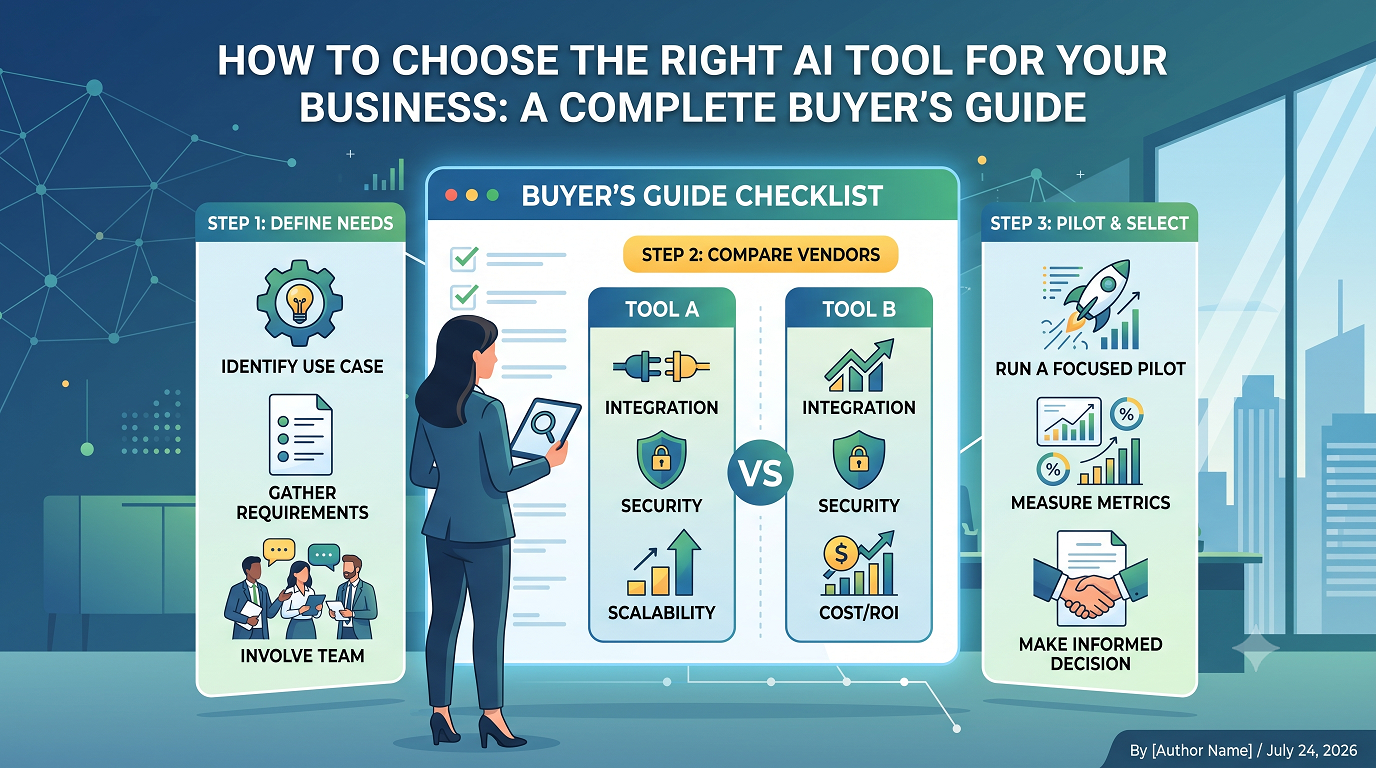
 You don’t buy AI every day, and the wrong choice can quietly drain budgets, frustrate your team, and stall projects for months. A clear, practical AI tool buying guide gives you a way to cut through the noise, ask smarter questions, and avoid shiny objects that don’t move the needle for your business.
This isn’t about finding the trendiest product; it’s about picking AI that fits your data, workflows, security needs, and budget. By the end of this guide, you’ll know how to compare vendors, what to test in a pilot, and how to build a simple approval path so your next AI purchase actually delivers.
Clarify why you need an AI tool before shopping
The fastest way to waste money is to start with a product demo instead of a problem. Before you even skim an AI tool guide, get specific about what you want AI to fix, speed up, or improve inside your business.
A good starting point is to map one or two high-impact use cases, such as triaging support tickets, qualifying leads, summarizing long documents, or drafting routine reports. Once you have those, you can treat this as your personal AI software buying guide and judge every product on how well it serves those exact workflows.
Define problems, not features
Write down three things that are painful or expensive right now. For example, maybe your sales team spends hours logging call notes, or your operations team drowns in repetitive data entry. Those real problems should drive how you choose AI tools, not whatever is trending this quarter.
For each problem, describe what a “good enough” improvement looks like. It might be cutting response time by 40%, improving data accuracy, or freeing up a full day per week for a key role. Those benchmarks will guide your AI tool selection and keep conversations with vendors focused on outcomes, not buzzwords.
Involve the right people early
AI tools ripple through teams, so you’ll want input from the people who will live with the results. Bring in at least one representative from the business side, one from IT, and someone who understands compliance or risk for your industry to keep your AI purchasing guide grounded in reality.
Ask potential users to share real examples, screenshots, or exports from their current process. These artifacts become your test data later and will make any AI software comparison far more accurate than generic demos or slide decks.
Translate your needs into clear AI requirements
Once you know what you’re solving, you can turn those ideas into practical requirements. This step doesn’t have to be complicated, but skipping it often leads to vague meetings where vendors promise everything and you learn very little.
Your goal is to build a short requirements document that lives alongside this AI software guide and sets expectations for functionality, integration, security, and support. Keep it concrete and avoid jargon wherever you can.
Functional and data requirements
Start with basic questions: What types of data will the system use, how often will it run, and who needs to access it? A thoughtful AI tool buying guide always pushes you to think about inputs and outputs, not just fancy features.
List the core actions the tool must perform, such as extracting entities from text, classifying incoming requests, or generating draft content that humans will review. These functional needs will anchor your AI buying checklist and keep you from getting distracted by extras you’ll never deploy.
Security, compliance, and deployment
AI systems touch sensitive information more often than most apps, so you should know basic guardrails before shortlisting vendors. Decide whether data can leave your region, whether you need on-premises options, and what level of encryption and audit logging is non-negotiable for your AI software guide.
Clarify who will own model configuration, access controls, and user training after launch. If your internal capabilities are limited, that should factor heavily into your AI purchasing guide, because tools that require deep in-house expertise may stall after the pilot.
Build a practical AI software comparison short list
With requirements in place, you can start scanning the market and narrowing options based on fit instead of hype. This is where you move from abstract research to a concrete AI software comparison that your leadership team can understand.
Begin by cutting any product that doesn’t support your data types, essential integrations, or compliance needs. That simple filter usually shrinks a long list of vendors down to a manageable set you can evaluate properly.
What to look for in vendor materials
Product pages, documentation, and case studies can reveal a lot if you know what to scan for. A serious AI software buying guide will tell you to look closely at implementation timelines, customer support channels, and how often the company ships meaningful updates.
Pay attention to whether they share real customer examples that look similar to your size and industry. These details matter more than slick marketing copy or generic claims about being the best AI software on the market.
Questions to ask while shortlisting
- Does the tool integrate with the systems you already use without major custom work?
- Can you export your data and models easily if you switch vendors later?
- Is pricing predictable based on your expected usage, or full of vague “contact sales” ranges?
- How transparent is the vendor about model updates and failure modes?
Run a focused pilot using an AI buying checklist
Instead of rolling out a new platform to everyone, start with a tight pilot that uses real data, real users, and clear success metrics. A structured AI buying checklist keeps that pilot organized and makes it easier to compare outcomes across vendors.
Set a fixed timeline, such as four to six weeks, and limit scope to one or two use cases. That balance gives you enough time to gather evidence without dragging things out so long that interest fades.
Designing a meaningful pilot
Use the artifacts you collected earlier—spreadsheets, tickets, transcripts—as test data for each product. A hands-on AI tool guide should always encourage you to test with messy, real-world examples instead of sanitized demo inputs.
Ask pilot users to record the time they spend, errors they see, and where they still need to intervene manually. These observations will carry more weight with executives than abstract scores from a generic AI purchasing guide that never touched your data.
Metrics worth tracking
- Time saved per task or per employee
- Error rates before and after using the tool
- Adoption rate among the target group
- User satisfaction and perceived trust in the AI outputs
Compare costs, risks, and long-term fit
Once you’ve run at least one pilot, you’ll have numbers you can put side by side. Now your AI tool buying guide shifts from “Does it work at all?” to “Is this sustainable, safe, and worth the trade-offs over the next few years?”
Create a simple table or scorecard that brings together pricing, performance, security posture, and support quality. This doesn’t have to be perfect; it just needs to make trade-offs visible so decision makers aren’t swayed purely by brand recognition or a charismatic sales rep.
Key dimensions to weigh
- Total cost of ownership: Subscription fees, implementation, training, and any usage-based charges.
- Operational risk: How the tool handles outages, data incidents, and model drift.
- Scalability: Whether it can handle increased volume or new use cases without major rework.
- Vendor stability: Financial health, customer references, and product roadmap clarity.
Use your notes and metrics to create internal AI tool recommendations instead of relying exclusively on external reviews. Your business context, data complexity, and risk tolerance are rarely identical to what you see in online ratings.
If you need to present options to leadership, turn your analysis into a short AI software guide that summarizes costs, performance, and key risks for each shortlisted product in one page per vendor.
Bringing it all together: choosing AI that actually helps
A thoughtful AI tool buying guide doesn’t push you toward one specific product; it helps you ask sharper questions and run smarter experiments. The right fit usually comes from a mix of clear use cases, honest pilots, and a simple framework for comparing long-term costs and risks.
If you take the time to define your problems, involve real users, and treat each pilot as a learning exercise, you’ll be far more confident in your final decision. When you’re ready for a structured way to compare vendors and document your process, Ai Buyer Guide can help you turn this approach into a repeatable AI purchasing playbook built around a practical AI tool buying guide.